
Backlinks in the Tubes Booster Video Template: Fast Setup, Easy Management
Backlinks are a natural part of every serious video website. Affiliate programs, advertising partners, analytics tools, or links to related projects all require outbound links that are easy to manage and safe from an SEO perspective. When designing Tubes Booster, our priority was clear: backlink management must be fast, simple, and completely no-code.
Instead of editing templates or logging into a server, Tubes Booster handles backlinks directly inside the video CMS template, fully managed from the admin panel.
Central backlink overview in the admin panel
All backlinks are displayed in a clear overview inside the administration interface. The administrator can instantly see which links are active, which are disabled, and how each backlink is configured. This view is designed for daily use and quick orientation.

Backlinks can be edited, temporarily disabled, or removed without affecting the rest of the website. This is especially useful for projects working with multiple partners, rotating affiliate offers, or frequently changing monetization strategies.
Adding a new backlink is fast and intuitive
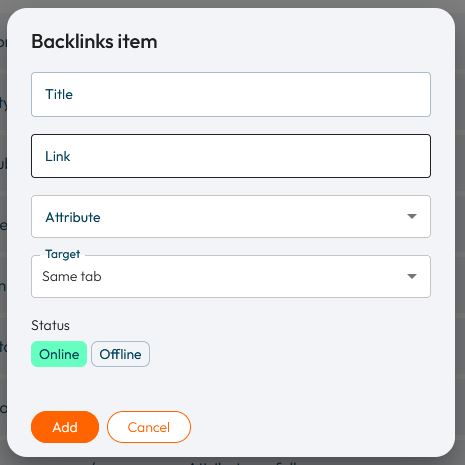
The process of adding a new backlink is intentionally minimal. The form contains only essential fields, avoiding unnecessary complexity. The administrator enters the link title, the destination URL, and selects how the link should behave.
Once saved, the backlink immediately appears on the homepage of the video website within the video template. No publishing steps, no deployments, and no cache clearing are required. This instant feedback makes backlink management part of the normal daily workflow.
Backlink parameters explained
Each backlink is defined by clear and understandable settings that do not require technical knowledge.
The title determines the visible text shown to visitors. It should be short, readable, and descriptive, typically the name of a service, brand, or project.
The URL defines the destination of the link. It is recommended to always use a full URL including HTTPS to ensure consistent behavior across browsers and devices.
SEO attributes: when and how to use them
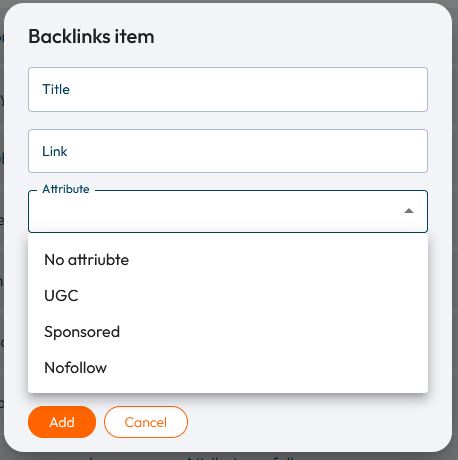
A crucial part of backlink configuration is the link attribute, which defines how search engines interpret the link. Tubes Booster supports modern SEO attributes in line with current search engine recommendations.
A link without any attribute is a standard backlink with no restrictions. This option is suitable for internal projects or natural, non-commercial references.
The nofollow attribute prevents SEO value from being passed. It is most commonly used for affiliate links, external tools, and third-party services.
The sponsored attribute is intended for paid and advertising links. Google recommends using this attribute for sponsored content and commercial partnerships to ensure transparency.
The UGC (User Generated Content) attribute is designed for links created by users, such as in comments or community sections. While it is used less frequently on homepages, its availability ensures consistent SEO behavior across the CMS.
By choosing the correct attribute, administrators retain full control over how backlinks influence SEO without dealing with technical implementation details.
Target and visibility in real-world use
Each backlink allows the administrator to define whether it opens in the same browser tab or in a new one. For external and affiliate links, opening in a new tab is the common and recommended approach.
Backlinks can also be set as active or inactive. This makes it easy to temporarily disable links for short-term campaigns, testing new partners, or ending collaborations without deleting the configuration.
Why this approach matters in practice
Video websites are constantly evolving. Monetization models change, affiliate programs come and go, and partnerships are updated regularly. A system that requires code changes or server access quickly becomes a bottleneck.
By integrating backlinks directly into the video CMS template, Tubes Booster allows administrators to react instantly. Links can be added, edited, or disabled in real time, from a single place, without technical overhead.



