
Video Site Tags: How They Work and Why They Matter
Tags are the part of a video site nobody deals with. They generate themselves, sit under the video in small grey type, and everyone treats them as something between metadata and decoration.
Yet they decide where your video shows up on the site and who ever sees it. And when nobody pays attention to them for long enough, they stop working for you and start working against you.
This tutorial is about how tags actually work — from the very beginning.
What a tag is (and what it isn't)
The most common assumption is that a tag is a keyword for Google. Like the old meta keywords, only modern. You write down the words you want to rank for, and Google reads them.
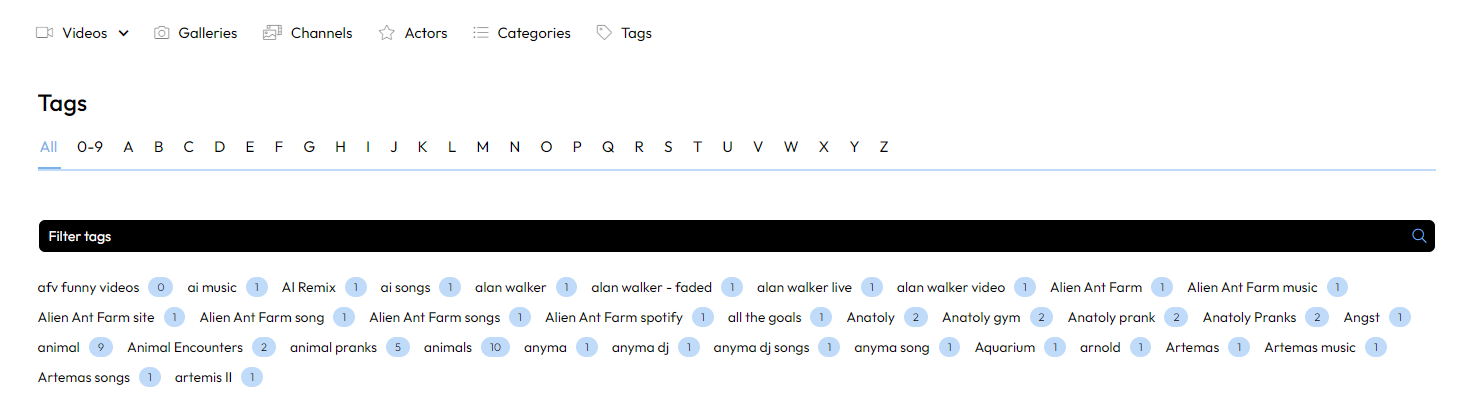
That's wrong, and it costs a lot of traffic, because it leads to thinking like "I'll throw in as many words as possible and cover everything."
A tag is a placement mechanism. It isn't a note to the search engine — it's an instruction to the site itself about where to file your video. The site builds its entire internal structure out of tags, and only then does that structure get shown to Google and to viewers.
The difference matters. A keyword is a description. A tag is an address.
Tag versus category
You have three categories on your site. Maybe five, maybe fifteen. They're fixed, you decided on them once, and they change about once a year. They're broad — Cars, Sports, Music — and they exist so that someone who doesn't yet know what they want has somewhere to look around.
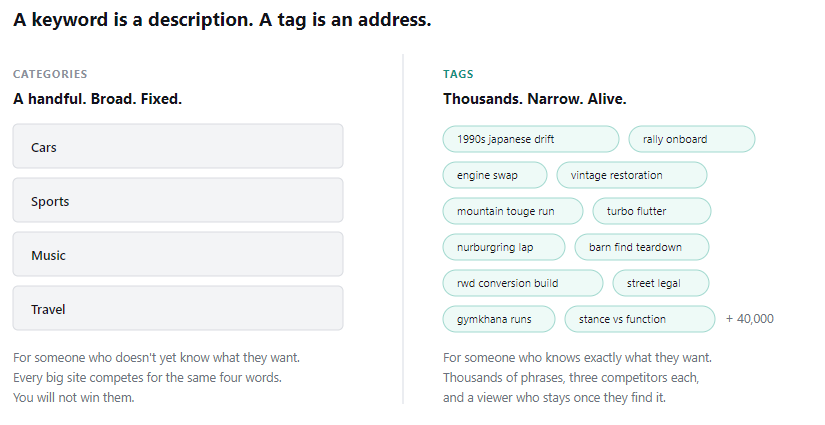
You have thousands of tags. Possibly hundreds of thousands. They appear on the fly, they're narrow and specific, and they exist so that someone who knows exactly what they want can find it.
That's the whole difference — and it's also why tags are worth more in traffic terms. Every major site in the world competes for "car videos" and you have no shot. For "1990s japanese drift compilation" you're up against maybe three pages, and the person searching it knows precisely what they want to see. When they find it, they stay.
There are thousands of phrases like that. Categories will never cover them. Tags will.
What happens when you put a tag on a video
This is the core of the whole thing. One tag fires three independent mechanisms at once.
A tag page gets created or filled. An address like /tags/vintage-cars/ is an automatically generated page listing every video carrying that tag. The site publishes it, Google finds it and indexes it. Suddenly you have a page that can rank — and nobody had to write it.
Internal search gets fed. When someone searches on your site directly, tags are one of the strongest signals for what to show them. Often stronger than the video description, which nobody fills in properly anyway.
Recommendations get fed. The algorithm deciding what appears in the sidebar next to a playing video looks for videos sharing tags. This is the most underrated part of the entire system.
Think of it this way: every tag is one road leading to your video. Twelve good tags build twelve roads. Two build two. And forty random ones build forty roads that go nowhere.
Where the traffic comes from
There are two channels and they work independently of each other.
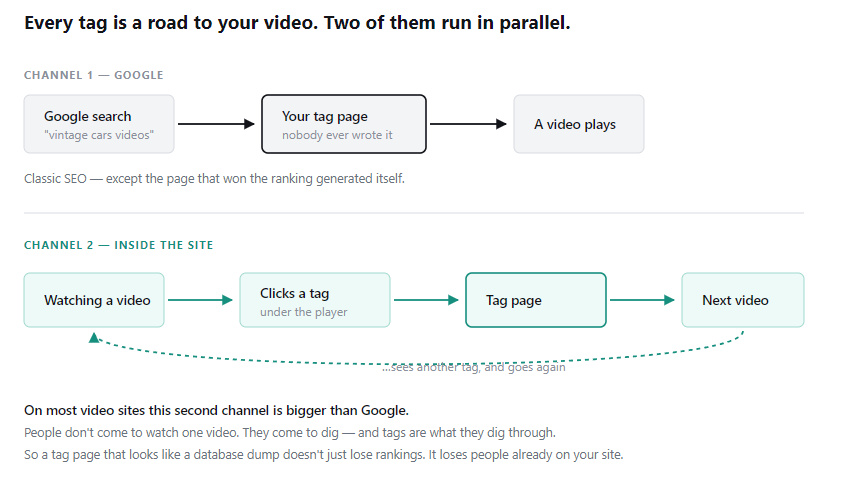
The first is Google. Someone searches "vintage cars videos", finds your tag page, clicks, sees a grid of videos, and plays one. Classic SEO — except the page that won it was never written by anyone. It generated itself.
The second is the inside of the site. Someone watches a video, sees a tag under it, clicks it, lands on the tag page, goes from there to another video, sees another tag. They're digging through your content and not closing the tab.
And here's the thing a lot of people don't realize: on most video sites the second channel is bigger than Google. People don't come to a tube site to watch one video. They come to dig. And tags are exactly what they dig through.
So if your tag pages look like a database dump — and most do — you're not just losing rankings. You're losing people who are already on your site.
Why it doesn't work for most sites
Three reasons. Always the same three.
You have thousands of empty tags
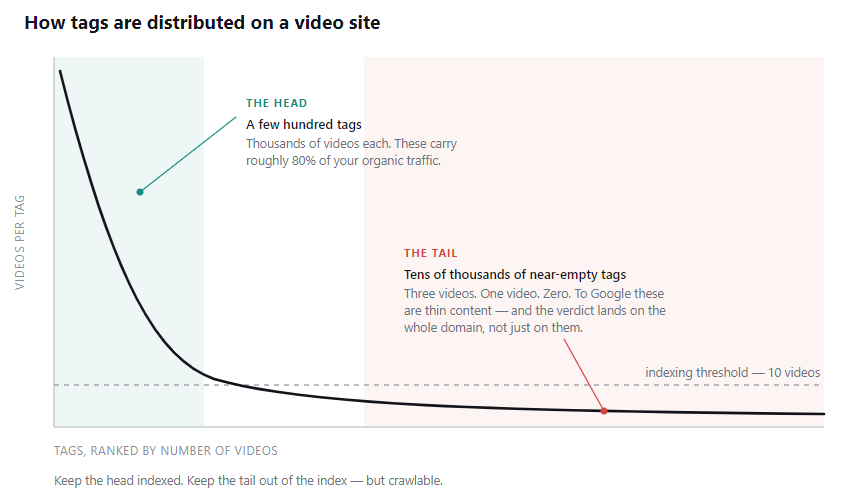
Tags distribute the same way on every site: a few hundred tags with thousands of videos each, followed by an endless tail of tags with three videos. Or one. Or zero, because the videos got taken down since.
A page with three videos and not one line of text is, as far as Google is concerned, an empty page. When you have forty thousand of them, Google doesn't think "this site has forty thousand boring pages." It thinks "this site mass-produces empty content" — and that's a verdict on the whole domain, not on one page. Those empty tags drag down the good ones too.
The fix isn't deleting them. The fix is a simple rule: a tag with fewer than ten videos simply doesn't get shown to Google. It isn't deleted, it works normally on the site, people can click it — it just isn't in the index. And once it grows past ten, it shows up on its own. Set it once and never touch it manually again.
You have five tags for the same thing
If tags appear freely — from uploads, from users, from imports — within a year your site has car, cars, Cars, auto and car-videos. Five pages saying the same thing.
Looks harmless. What it actually means is that your car videos are scattered across five piles and not one of them is big enough to win. Instead of one strong page you have five weak ones stealing rankings from each other. You're competing with yourself.
The fix is merging them into one and redirecting the rest. Then keeping new duplicates from appearing — either tags come from an approved list, or at minimum a brand-new tag gets shown to someone for approval the first time it appears. A free text field is an invitation to chaos.
Your tag pages are empty boxes
Most sites generate a tag page with "Tag: cars" in the title, the word "cars" as the heading, and a grid of videos underneath. That's it.
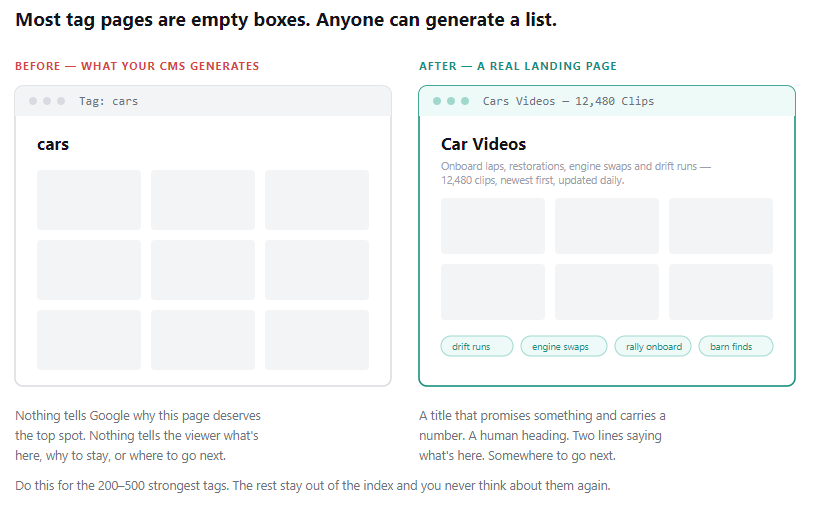
Put yourself in Google's shoes for a second. Why would you push that page to the top? There's nothing on it but a list. Anyone can generate a list.
Now put yourself in the viewer's shoes. They came from Google looking for something specific and landed on a page that looks like an admin panel. Nothing tells them what's here, why they should stay, or where to go next.
A tag page becomes a real page when it has a title that promises something — Cars Videos — 12,480 Clips says far more than Tag: cars, and that number genuinely lifts click-through in the search results. When it has a human heading instead of a raw string from the database. When there are a few lines of text above the grid telling the viewer what they'll find here. And when it links out to related tags so they have somewhere to go.
You don't have to do this for every tag — that isn't even possible. Do it for the two to five hundred strongest ones that carry most of your traffic. The rest stay out of the index and you never think about them again.
How to do it, in order
If you were starting tomorrow, this is the sequence.
Find out where you stand. Open Search Console and look at how many of your tag pages are actually indexed. Compare that to how many you have in total. If you're indexing nearly all of them and you have a long empty tail, you're indexing garbage. If you're indexing a fraction, you're leaving traffic on the table. That one number tells you where the problem is.
Turn on the threshold. Tags under ten videos out of the index. A day's work, immediate effect.
Collect the duplicates. Go through your strongest tags and find the ones saying the same thing. Merge, redirect the rest. You stop competing with yourself.
Write text for the top two hundred. The slowest part, a few weeks of work. Also the part that pays the most — and the part your competitors won't do, because they can't be bothered.
Fix the internal linking. Put five to eight genuinely related tags under each video, not an alphabetical list. Link from tag pages to other tag pages. Throw out the four-hundred-link tag cloud in the footer; it doesn't work and never did.
Check on it once a quarter. Tags are a living system. Trends shift, dead tags pile up, new duplicates appear. An hour every three months is enough — but it has to happen.
That last part is where most people fall down, incidentally. Not because they don't want to, but because going through a hundred thousand tags by hand simply isn't doable. Which is why the Video CMS in Tubes Booster does it for you — dead tags, duplicates and rising trends come out as a list you can actually work with.
The short version
A tag isn't a keyword. It's a road to your video.
Tag pages are landing pages you already own — they generated themselves and cost you nothing. Most sites have them empty, scattered, and sitting in the index doing damage. Clean them up and they start doing the job they were built for.
Traffic from tags is the cheapest traffic on any video site. You don't have to pay for it or produce it. You just have to stop throwing it away.



